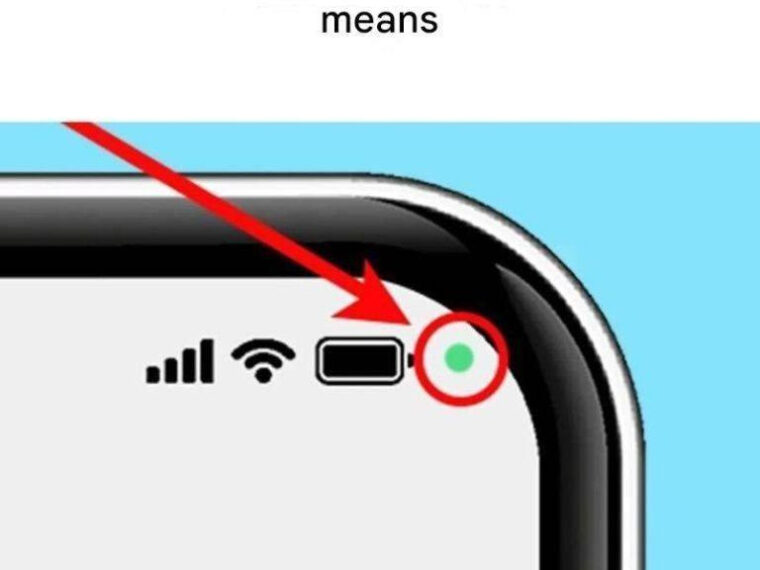
In rare cases, malicious apps may attempt to misuse permissions.
However:
Modern Android versions require apps to request permission before accessing camera or microphone.
You must approve it.
If you are careful about:
- Downloading apps only from trusted sources
- Reviewing app permissions
- Keeping your system updated
Risk remains low.
The green dot is actually your protection.
It ensures you are alerted immediately.
Common Situations That Trigger the Green Dot
Here are everyday scenarios where the dot appears:
- WhatsApp voice message recording
- Instagram camera access
- TikTok recording
- Zoom or Google Meet calls
- Voice assistant listening
- Voice-to-text typing
- QR code scanning apps
Sometimes apps briefly activate the microphone for background functions.
The dot may appear for a second and disappear.
This is usually normal behavior.
How to Strengthen Your Privacy Further
Android offers additional tools:
1. Quick Toggles
Swipe down and look for:
- Microphone access toggle
- Camera access toggle
You can disable both entirely.
When turned off, no app can access those sensors.
2. Privacy Dashboard
Under:
Settings → Privacy → Privacy Dashboard
You can see:
- Which apps accessed camera
- Which apps accessed microphone
- How frequently
- When
This gives you a full usage timeline.
3. App-Specific Controls
For sensitive apps, choose:
“Only while using the app”
This prevents background access.
Why This Feature Is Actually Good News
That tiny green dot represents progress.
Years ago, users had no way of knowing if their sensors were active.
Now, you get real-time visibility.
Instead of guessing, you see.
Instead of worrying, you verify.
Transparency builds trust.
When Should You Truly Be Concerned?
Consider investigating further if:
- The dot appears frequently without explanation
- It activates when the phone is idle
- You notice unusual battery drain
- Your device overheats unexpectedly
In such cases:
- Run a security scan
- Check installed apps
- Update your operating system
- Consider resetting suspicious permissions
But in most situations, the green dot simply reflects normal app behavior.
Final Thoughts
That green dot is not a threat.
It’s a notification.
It means your camera or microphone is active.
It exists to give you control.
If you understand what it represents, it becomes reassuring rather than alarming.
In a world where privacy concerns are real, small visual cues like this matter.
So next time you see that little green circle glowing in the corner of your screen:
Don’t panic.
Just swipe down.
Check.
And stay informed.
Because knowledge — not fear — is the best security feature your phone has.